coa
Log inGet started
Security & Privacy

Enterprise security.Private by design.

Coa is built and run to the standard of enterprise software, with privacy designed in from the start. Every connection is read-only. Your data is encrypted down to the field. Our own team sees a member code, not you, and your data is never sold or shared.

Connecting accounts

Connect your accounts with confidence.

You log in on your brokerage’s own screen, and Coa gets a read-only view. It can see your balances and holdings. It can never trade or move money.

Connect Schwab
About a minute
Read-only
✓
Sign in on schwab.com
Your username and password go to Schwab, not to Coa.
✓
Approve read-only access
Through Plaid or SnapTrade, the same connections thousands of finance apps use.
3
Your holdings appear in Coa
Balances and holdings, encrypted from end to end.
Coa can’t trade or move money

How your data reaches Coa.

You log in through your own brokerage, on its website, not on Coa. Your brokerage then gives Coa a read-only view. Your login never passes through Coa.


Your brokerageYou log in on your brokerage’s own site, with the login you already use.
Read-only→
9f3a c21e 7b04
0d9c 3e71 a6b2
Encrypted linkYour data is encrypted at rest with AES-256 and in transit with TLS.
View only→
$45,652,873View only
Your CoaSees balances and holdings. Can’t trade, transfer or withdraw.

How we protect you.

Five safeguards on every account you connect.

PlaidSnapTrade
Read-only access
Balances and holdings. Nothing else.
01Read-only, by design.Coa connects through Plaid and SnapTrade, trusted aggregators that only provide read-only access. Coa cannot take any action in your accounts.
schwab.com
Username
••••••••
Log in
02Your credentials stay with your bank.You log in on your brokerage’s or bank’s own screen. Your credentials stay with them.
$1,850,000→a91f·07ce
AES-256 at restTLS in transit
03Bank-level encryption.Your data is encrypted at rest with AES-256 and in transit with TLS, from your accounts to your screen.
What our team sees
MemberCX-48F2-91
Name•••••• ••••
HoldingsLocked
04Anonymous to our team.Our team sees a code, not your name or email, and never your holdings unless you ask us to help.
Export everythingDelete all my data
05Leave, and your data leaves with you.Export everything, then delete it all with one click.
You’re in control

Your data. Your rules.

You decide what Coa sees, who else sees it, and when it’s gone.

Choose what to connectConnect only the accounts you want. Add private assets by document or by hand, or leave them out.
Disconnect anytimeRemove any account and Coa stops reading it right away.
Export everythingTake your holdings, documents and history with you.
Delete with one clickEverything you’ve stored in Coa, gone.
ConnectionsRead-only
Schwab · Trust Core
Synced 2 min ago
Fidelity · Joint
Synced 2 min ago
Chase Private Client
Disconnected
Carta · Fund IV
Updated from statement
Export everythingDelete all data
Family Office

Want it even more private?

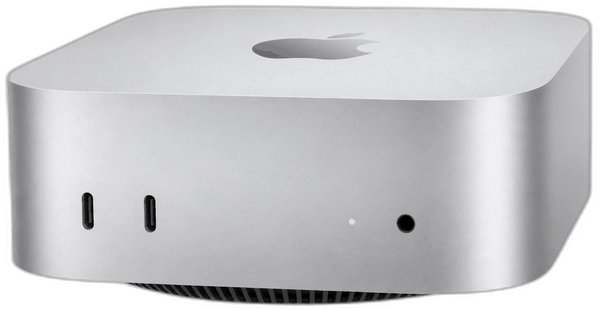
Family Office clients can keep Coa in a private cloud behind a Tailscale network, or on a Mac mini in their own office. Setup is done under NDA.

Private cloudMac miniUnder NDARead-only, always
See Family Office privacy ›
Mac mini

Questions about security.

Can Coa trade or move my money?+

No. Connections are read-only. You log in on your brokerage's own screen, and Coa never sees your password. It can see balances and holdings, and nothing else. Coa connects through Plaid and SnapTrade, which only provide read-only access, so there is no setting that could let it trade or move money.

Can anyone at Coa see my portfolio?+

Not by default. Our team sees a member code, not your name, email or holdings. Your portfolio only opens to us if you ask for help, and only for that request. Family Office clients can go further and keep Coa on a private cloud or a Mac mini in their own office.

How is my data encrypted?+

Your data is encrypted at rest with AES-256 and in transit with TLS. Coa never stores your bank or brokerage logins. You sign in on their own screen, and your credentials stay with them.

What happens to my data if I leave?+

You can export everything at any time: holdings, transactions, documents and reports. When you close your account, one click deletes your data from Coa. Nothing is kept for marketing or resale.

Do you sell or share my data?+

No. Never. Coa doesn't sell or share your data with advertisers, data brokers or anyone else, and it isn't used to target you. Coa makes money from memberships, not from your information. Your data is only used to run your own Coa.

Can I control what my family or CPA sees?+

Yes. You choose exactly which accounts and entities each person can see, whether that's a spouse, an adult child, a CPA or an attorney. Their access is read-only, so they can view what you share but can't change anything, and you can remove access at any time.

More in Coa
See itGlobal Net WorthEverything you own, public and private, in one live number.Learn more ›Watch itAI DeskAgents watch every holding and tell you what changed.Learn more ›Get ahead of itCatalystsOdds on the events most likely to move your positions.Learn more ›
Connect your first account in minutes.
Read-only, always. Delete everything with one click.
Get started for freeBook a call ›